Before You Begin
kubectlv1.28+ and a Kubernetes cluster (Minikube or cloud)- Basic understanding of Deployments, Services, and Ingress
nginx-ingresscontroller installed (for Canary strategy)
The Base Architecture: Load-Balanced City API
Our service exposes a REST API returning city data for Sydney, Melbourne, and Brisbane. The production Deployment uses a multi-stage Dockerfile (see standards) and includes both readiness and liveness probes.
# deployment-city-api.yaml
apiVersion: apps/v1
kind: Deployment
metadata:
  name: city-api
  labels:
    app: city-api
    version: v1
spec:
  replicas: 3
  selector:
    matchLabels:
      app: city-api
  template:
    metadata:
      labels:
        app: city-api
        version: v1
    spec:
      containers:
      - name: api
        image: registry.example.com/city-api:v1
        ports:
        - containerPort: 8080
        resources:
          requests:
            memory: "64Mi"
            cpu: "50m"
          limits:
            memory: "128Mi"
            cpu: "100m"
        livenessProbe:
          httpGet:
            path: /healthz
            port: 8080
          initialDelaySeconds: 10
          periodSeconds: 15
        readinessProbe:
          httpGet:
            path: /ready
            port: 8080
          initialDelaySeconds: 5
          periodSeconds: 5
# service-city-api.yaml
apiVersion: v1
kind: Service
metadata:
name: city-api
spec:
selector:
app: city-api
ports:
- port: 80
targetPort: 8080The readiness probe is critical: it tells the Service when a pod is ready to receive traffic. Without it, a new pod may be added to the load balancer before its application code is fully initialized, causing 503 errors.
Strategy 1: RollingUpdate – The Default Workhorse
Kubernetes Deployments default to RollingUpdate. It incrementally replaces pods, keeping the Service available. The maxSurge and maxUnavailable fields control the pace.
# deployment-city-api-rolling.yaml (partial)
spec:
  strategy:
    type: RollingUpdate
    rollingUpdate:
      maxSurge: 25%
maxUnavailable: 25%Behavior: When updating to v2, the old ReplicaSet scales down and new one scales up, never exceeding 25% above or below desired replicas. This is the simplest pattern and works well for stateless services.
Comparison: RollingUpdate consumes minimal extra resources (only 25% surge), but it can cause brief traffic spikes to unhealthy pods if readiness probes are not prompt. Rollback is done by reverting the image tag, which triggers another rolling update.
Strategy 2: Blue-Green – Instant Switch with Dual Environments
Blue-Green runs two full deployments simultaneously: one “blue” (current) and one “green” (new). The Service selector points to the active version. Switching is a single label update.
# deployment-city-api-blue.yaml
apiVersion: apps/v1
kind: Deployment
metadata:
  name: city-api-blue
  labels:
    app: city-api
    color: blue
    version: v1
spec:
  replicas: 3
  selector:
    matchLabels:
      app: city-api
      color: blue
  template:
    metadata:
      labels:
        app: city-api
        color: blue
        version: v1
    # ... container spec with city-api:v1
Similarly create deployment-city-api-green.yaml with color: green and version: v2. The Service initially selects color: blue.
# service-city-api.yaml (update selector)
spec:
  selector:
    app: city-api
    color: blue
To switch, run:
kubectl patch service city-api -p '{"spec":{"selector":{"color":"green"}}}'Comparison: Blue-Green provides zero-downtime switching and an instant rollback (just re-patch selector). However, it doubles resource consumption. It also requires the new version to be fully deployed and tested before the switch. A common pitfall on StackOverflow is forgetting to scale down the old deployment after the switch, wasting resources.
Strategy 3: Canary – Gradual Traffic Shift for Validation
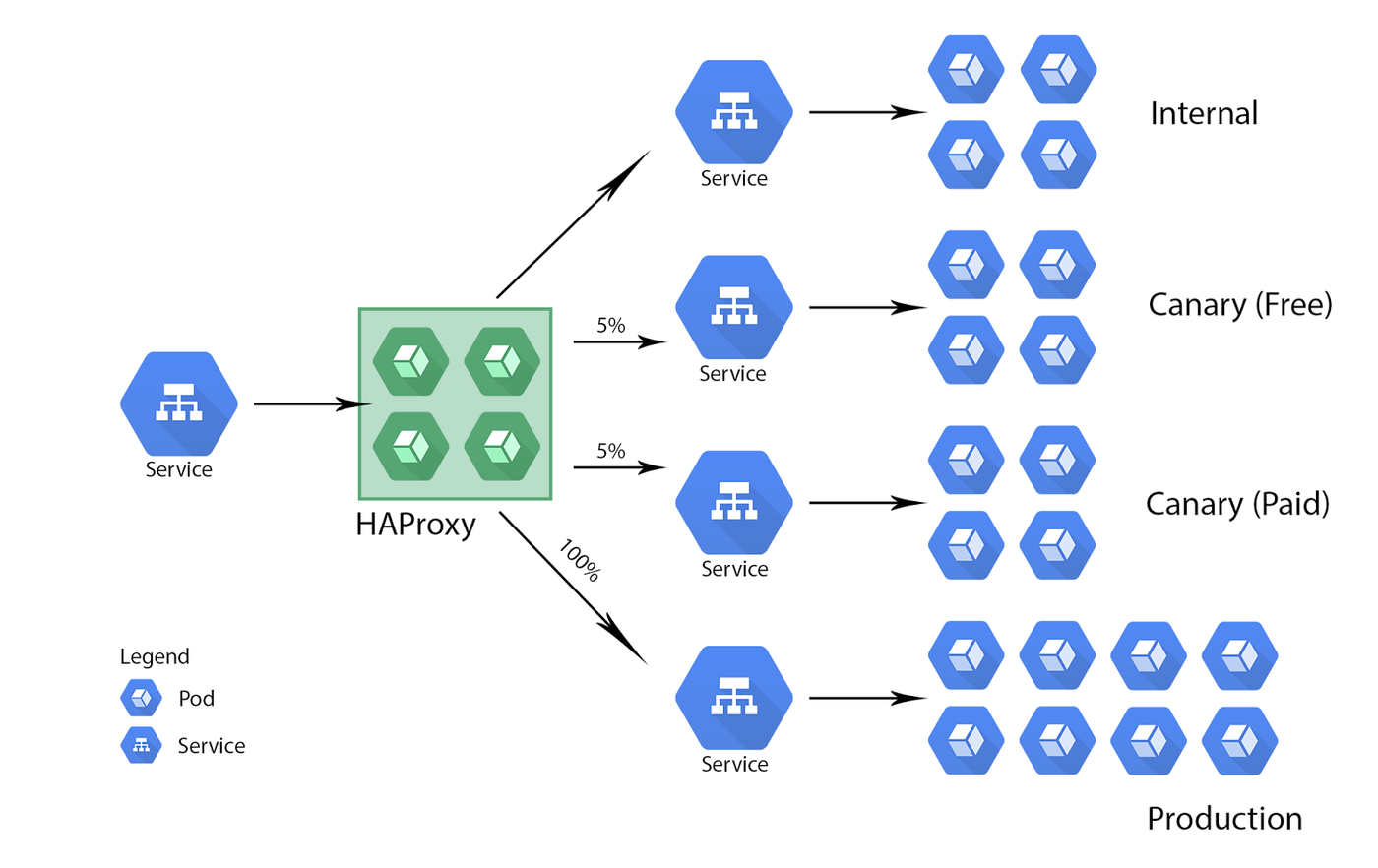
Canary releases route a small percentage of traffic to the new version, allowing monitoring before full rollout. With nginx-ingress, we use the canary annotation.
# ingress-city-api-canary.yaml
apiVersion: networking.k8s.io/v1
kind: Ingress
metadata:
  name: city-api-canary
  annotations:
    nginx.ingress.kubernetes.io/canary: "true"
    nginx.ingress.kubernetes.io/canary-weight: "10"
spec:
  ingressClassName: nginx
  rules:
  - host: api.cities.example.com
    http:
      paths:
      - path: /
        pathType: Prefix
        backend:
          service:
            name: city-api-v2
            port:
              number: 80
This ingress sends 10% of requests to city-api-v2 (the canary service) while the main ingress (without canary annotation) sends 100% to city-api-v1. To increase the weight to 50% and then 100%, edit the annotation.
Comparison: Canary is the safest pattern for validating new code with real traffic. It requires a service mesh or ingress controller that supports traffic splitting. Rollback is instant by setting weight to 0. Resource overhead is the canary deployment (e.g., 1 replica). Complexity is higher due to additional ingress and monitoring.
Side-by-Side Comparison
| Strategy | Downtime | Resource Overhead | Rollback Speed | Complexity | |----------|----------|-------------------|----------------|------------| | RollingUpdate | Near-zero (depends on probe) | Low (25% surge) | Slow (reverse update) | Low | | Blue-Green | Zero | 2x full deployment | Instant (label patch) | Medium | | Canary | Zero | Minimal (1-2 pods) | Instant (weight 0) | High |
Common Issues and Solutions
1. PodDisruptionBudget (PDB): Without a PDB, a RollingUpdate can drain all pods during node maintenance, causing downtime. Always set a PDB:
apiVersion: policy/v1
kind: PodDisruptionBudget
metadata:
  name: city-api-pdb
spec:
  minAvailable: 2
  selector:
    matchLabels:
      app: city-api
2. Readiness probe misconfiguration: Many developers on StackOverflow report that their new pods are never marked Ready. The probe must target a path that returns HTTP 200 only when the app is fully initialized. For example, a database connection check inside /ready.
3. Session affinity: If your service uses sticky sessions (sessionAffinity: ClientIP), a RollingUpdate can break sessions because pods are replaced. Blue-Green or Canary are better choices. Alternatively, use a database-backed session store.
4. Traffic draining: When pods are removed during a RollingUpdate, existing connections may be dropped. The terminationGracePeriodSeconds should be set to allow in-flight requests to complete (e.g., 30s).
5. Canary weight not working: Ensure the canary Ingress has the correct annotations and that the main Ingress does NOT have the canary annotation. Also, nginx-ingress must be installed with the canary feature enabled (default in most charts).
Choosing the Right Pattern
Engineering blogs from companies like Netflix and Shopify suggest that no single pattern fits all. For a load-balanced city API with low traffic, RollingUpdate is sufficient. For high-traffic services where zero-downtime and instant rollback are critical, Blue-Green is the go-to. For new features that need real-world validation, Canary is the gold standard.
The official Kubernetes documentation recommends starting with RollingUpdate and adding Blue-Green or Canary as your monitoring maturity grows. Always test your deployment strategy in a staging environment first.

Final Thoughts
Zero-downtime deployments are not just about the strategy; they are about the entire pipeline—health checks, pod disruption budgets, and monitoring. Treat your deployment pattern as a code artifact, version it, and review it during incident post-mortems. The city API example scales to any microservice: just swap the city names with your service names and adjust the probes.
Memuat komentar...